0 ratings

Item #:
58581110
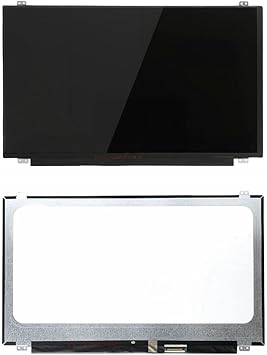
Screen Replacement for HP 15-BS 15-BS020WM 15-BS244WM 15-BS144WM 15-BS060WM 15-BS070WM 15-BS289WM L20380-001 15.6" WXGA HD LED LCD Display Touch
Item #:
58581110
TTD 608
Price Details
Excluding Shipping & Custom charges ( Shipping and custom charges will be calculated on checkout )
*All items will import from US
0 ratings
Write a review
In stock
 Imported from USA store
QTY:
Order now and get it around Tuesday, July 14
Secured transaction
Ubuy works hard to protect your security and privacy. Our advanced payment security system ensures confidentiality by encrypting your information during transmission using AES (Advanced Encryption Standards) and SSL (Secure Socket Layer) protocols. Your payment details are 100% secure as we do not share your payment details with third party sellers.
Our Top Logistics Partners


Each item has been tested before shipping.

Fast
Shipping

Free
Return*

Secure Packaging

100% Original Products

PCI DSS Compliance

ISO 27001 Certified


What Stands Out
Touch Screen Technology
Offers intuitive interaction with responsive touch capabilities, enhancing user experience for tasks like browsing, gaming, and creative work.
High-Quality Display
Delivers vibrant colors and sharp visuals with WXGA HD resolution, ensuring excellent clarity for everyday tasks and media consumption.
Compatible Design
Specifically designed for multiple HP 15-BS models, ensuring a perfect fit and easy installation, reducing downtime and hassle for users needing a quick replacement.
Product Details
| Item Weight | 1.5 lbs (680 grams) |
Who Should Buy?

-
DIY Repair Enthusiasts
Ideal for users comfortable with laptop repairs, saving money on professional services while replacing their screen.
-
Budget-Conscious Users
Perfect for students or professionals looking to extend the life of their HP laptops affordably without buying new devices.
-
HP 15-BS Owners
Specifically designed for various models of HP 15-BS series, ensuring compatibility and proper functionality after installation.

-
Non-Technical Users
Those unfamiliar with laptop repairs may struggle with installation, risking further damage or malfunction.
-
Users Preferring Whole Units
Individuals looking to upgrade or replace their entire laptop won't benefit from just a screen replacement.
-
High-End Gaming Needs
Gamers requiring high performance and graphics should consider higher-spec models instead of this budget-friendly screen replacement.
Product Description
Screen Replacement for HP 15-BS 15-BS020WM 15-BS244WM 15-BS144WM 15-BS060WM 15-BS070WM 15-BS289WM L20380-001 15.6" WXGA HD LED LCD Display Touch Screen Assembly B156XTK01.0(No Bezel)
Have any Query? Chat with us
Customer Questions & Answers
-
Question:
What specifications should I look for when purchasing a replacement screen for HP 15-BS models?
Answer: When purchasing a replacement screen for HP 15-BS models, ensure it is a 15.6 WXGA HD LED LCD display, compatible with your specific model such as the 15-BS020WM or 15-BS244WM. Consider additional features like touch-screen capability if your original display had this function. Also, check for the correct connector type and resolution, as these factors affect compatibility and performance. Use cases include restoring full functionality to your laptop for both work-related tasks and leisure activities like streaming. -
Question:
Is it possible to replace the screen myself, and what tools are needed?
Answer: Yes, you can replace the screen yourself with the right tools and guidance. You'll typically need tools like a screwdriver set, a spudger, and anti-static gloves to avoid damaging the components. Comprehensive online tutorials or guides can be very helpful, providing a step-by-step process tailored to your HP model. Self-replacement is beneficial for minimizing costs and gaining hands-on experience with laptop maintenance, making it a rewarding task for DIY enthusiasts. -
Question:
What causes a laptop screen to crack or fail?
Answer: Laptop screens can crack or fail due to various reasons, including accidental drops, pressure from heavy objects placed on the laptop, or manufacturing defects. Environmental factors like temperature changes can also impact the display. Understanding these causes can help you take better care of your devices, preventing screens from becoming damaged, which is essential for maintaining productivity and ensuring good performance in daily use. -
Question:
How do I know if my HP 15-BS screen is compatible with other models?
Answer: Compatibility for the HP 15-BS screen can often be verified through the part number, L20380-001 in this case, which indicates fitment across various models. Checking the specifications of both your laptop and the replacement screen ensures they match in dimensions, connector type, and screen technology. This awareness is crucial when searching for replacements, ensuring you don’t end up with an incompatible screen that can lead to further frustration. -
Question:
What are the signs that I need a screen replacement?
Answer: Common signs of needing a screen replacement include visible cracks, flickering, dark spots, or portions of the screen not responding to touch. If your display is damaged, it can make even basic tasks challenging. Identifying these signs early can help you address issues before they worsen, ensuring that your laptop remains fully functional for educational, professional, and personal tasks, enhancing productivity. -
Question:
What is the difference between LED and LCD screens?
Answer: The primary difference between LED and LCD screens lies in their backlighting technology. LED screens use light-emitting diodes for backlighting, offering better brightness, contrast, and energy efficiency than standard LCD screens, which may utilize fluorescent lights. For users needing superior display quality, such as graphic designers and gamers, LED technology provides enhanced visual clarity, making it the preferred choice for many laptop users. -
Question:
Can I upgrade from a non-touch to a touch screen display for my HP 15-BS?
Answer: Upgrading from a non-touch display to a touch screen for your HP 15-BS is possible but involves more than just replacing the screen. You may also need to consider motherboard compatibility, drivers, and touch control circuitry. It’s important to confirm if your existing hardware can support this upgrade. Touch displays can enhance interaction and ease of use, especially for applications that benefit from touch functionality, like design or educational software. -
Question:
How do I prevent future screen damage on my laptop?
Answer: Preventing future screen damage involves adopting best practices such as using a protective case, avoiding placing heavy items on the laptop, and being mindful of screen space when transporting. Regular maintenance checks to clean the screen and casing also help preserve the overall condition. By practicing these habits, you can prolong your device's lifespan, maintaining its functionality for everyday tasks, whether for work or leisure. -
Question:
Where can I buy a Screen Replacement for HP 15-BS models in Trinidad and Tobago?
Answer: You can buy a Screen Replacement for HP 15-BS models at Ubuy in Trinidad and Tobago. Ubuy offers a wide selection of replacement screens, ensuring you find the right match for your specific model. Their platform is designed for easy navigation, allowing you to filter products based on compatibility and specifications. By choosing Ubuy, you can have confidence in accessing quality parts, making it a reliable option when looking for specific replacements. -
Question:
What should I do if my new screen doesn’t work after installation?
Answer: If your new screen doesn’t work after installation, first check all cable connections to ensure they are secure and correctly aligned. Next, test the laptop with the original screen to determine if the issue lies with the new screen or the laptop itself. Should the problem persist with the new screen, consult troubleshooting resources specific to your model. This attention to detail can save time and help ensure that your laptop functions as required for all daily activities.
NBPCLCD Replacement Screens Editorial Review
No editorial reviews found
Customer Reviews & Ratings
1 customers ratings
-
5 Star
100%
-
4 Star
0%
-
3 Star
0%
-
2 Star
0%
-
1 Star
0%
Review this product
Share your thoughts with other customers
Platform Trust & Buyer Confidence

MT
Mohd
Verified buyer
“The product received very good packaging & safe…Thank You”
16 June 2026 · via Trustpilot
SJ
Shawati
Verified buyer
“Accurate delivery timing given”
16 June 2026 · via Trustpilot
YB
Youcef
Verified buyer
“Not madly expensive like I thought, and much quicker than promised.”
15 June 2026 · via Trustpilot
LM
Leila
Verified buyer
“Never dealt with Ubuy before, but everything worked out great. Seamless cross border purchasing and shipping. Thanks!”
6/7/2026 · via Trustpilot
KA
Kwame
Verified buyer
“The process was smooth, with clear communication and timelines. This was my 1st purchase and I am really impressed. I will definitely be coming back.”
12 June 2026 · via Trustpilot
Secure Checkout
Global Delivery
Easy Returns
Genuine Products
Product Price History
Important information
- Limitations : For products shipped internationally, please note that any manufacturer warranty may not be valid; manufacturer service options may not be available; product manuals, instructions, and safety warnings may not be in destination country languages; the products (and accompanying materials) may not be designed in accordance with destination country standards, specifications, and labeling requirements; and the products may not conform to destination country voltage and other electrical standards (requiring use of an adapter or converter if appropriate). The recipient is responsible for assuring that the product can be lawfully imported to the destination country. When ordering from Ubuy or its affiliates, the recipient is the importer of record and must comply with all laws and regulations of the destination country.
- Not all the products listed on Ubuy are for sale, as Ubuy is a global search engine. Products are subject to export/trade regulations.
TTD 608
Order now and get it around Tuesday, July 14
This item is not restrict in my country.(Please click on above link if this item is not restrict in your country, So our team will review and allow.)
QTY:
Secured transaction
Ubuy works hard to protect your security and privacy. Our advanced payment security system ensures confidentiality by encrypting your information during transmission using AES (Advanced Encryption Standards) and SSL (Secure Socket Layer) protocols. Your payment details are 100% secure as we do not share your payment details with third party sellers.
Our Top Logistics Partners
Fastest cross-border delivery
Features & Benefits
- 100% new and high-quality laptop LCD screen.
- Compatible with specific HP laptop models.
- Resolution of 1366x768 WXGA HD for a clear display.
- Screen finish is glossy with LED backlight lamp technology.
- Comes with 40 pins video connector.
- LCD screens are rigorously tested and graded A+++.