- Home Page /
- Office Products /
- Office Electronics /
- Other Office Equipment /
- Label Makers /
- Brother P-touch, PTD210, Easy-to-Use Monochro...
0 ratings

Item #:
305722
Brother P-touch, PTD210, Easy-to-Use Monochrome Label Maker, One-Touch Keys, Multiple Font Styles, 27 User-Friendly Templates, White
89% of respondents would recommend this to a friend
Item #:
305722
TTD 573
Price Details
Excluding Shipping & Custom charges ( Shipping and custom charges will be calculated on checkout )
*All items will import from US
0 ratings
Write a review
In stock
 Imported from USA store
QTY:
Order now and get it around Saturday, September 19
Secured transaction
Ubuy works hard to protect your security and privacy. Our advanced payment security system ensures confidentiality by encrypting your information during transmission using AES (Advanced Encryption Standards) and SSL (Secure Socket Layer) protocols. Your payment details are 100% secure as we do not share your payment details with third party sellers.
Our Top Logistics Partners


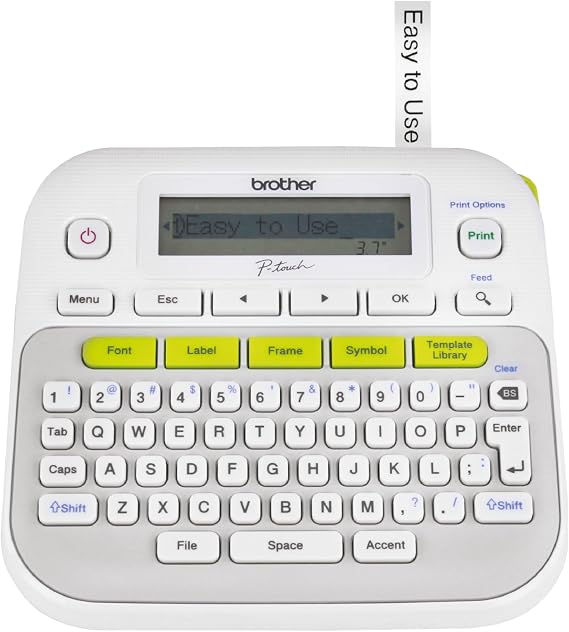
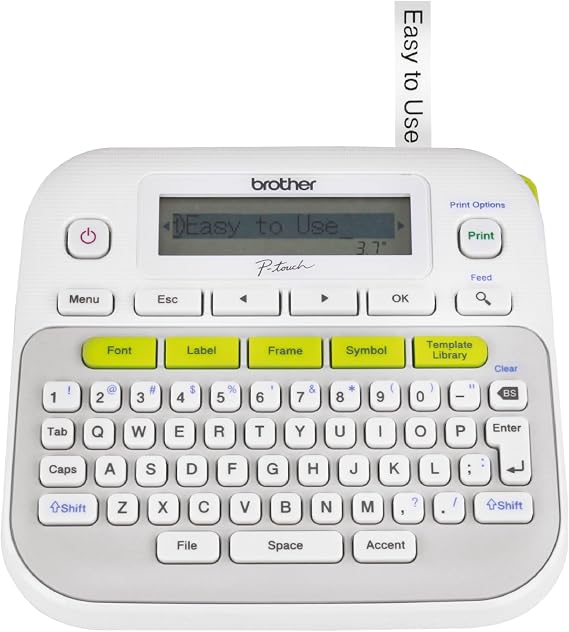
The Brother P touch PT D210 makes it easy to create great looking labels with its convenient one touch keys, 14 fonts, 97 frames and more than 600 symbols

Fast
Shipping

Free
Return*

Secure Packaging

100% Original Products

PCI DSS Compliance

ISO 27001 Certified



What Stands Out
User-Friendly Design
The Brother P-touch PTD210 is designed for effortless use, featuring one-touch keys that simplify labeling tasks, making it ideal for users of all skill levels, from beginners to seasoned professionals.
Customizable Options
With multiple font styles and 27 user-friendly templates, this label maker allows for personalized and creative label designs, catering to diverse labeling needs in home, office, or school settings.
Compact Portability
The lightweight and compact design of the PTD210 ensures easy portability, enabling users to take their labeling tasks on the go, without sacrificing functionality or convenience.
Product Details
- Easy-to-use label maker for home or office use
- Convenient one-touch keys for quick access to fonts, frames, symbols, and templates
- Graphical display to preview label appearance before printing
- Features 14 fonts, 10 unique styles, 97 frames, and over 600 symbols for personalization
- Lightweight and portable, powered by 6 AAA batteries or AC power adapter
- Compatible with a variety of Brother Genuine P touch TZe tapes for durable labels
Who Should Buy?

-
Home Organizers
Ideal for those looking to label storage boxes, jars, or files for easy organization and quick identification.
-
Small Business Owners
Perfect for creating professional labels for products, inventory, and office supplies to maintain an organized workspace.
-
Teachers and Educators
Beneficial for preparing classroom materials, labeling student supplies, and organizing lesson plans efficiently.

-
Heavy-Duty Users
Not suitable for industrial or extensive labeling tasks that require more advanced features or durability.
Product Description
Brother P-touch, PTD210, Easy-to-Use Monochrome Label Maker, One-Touch Keys, Multiple Font Styles, 27 User-Friendly Templates, White
Have any Query? Chat with us
Customer Questions & Answers
-
Question:
What features make the Brother P-touch PTD210 an easy-to-use label maker?
Answer: The Brother P-touch PTD210 stands out due to its intuitive one-touch keys, which allow users to quickly and easily create labels with minimal effort. It supports multiple font styles and sizes, enabling customization to suit different labeling needs. Additionally, the inclusion of 27 user-friendly templates streamlines the process, making it ideal for both home and office use. For example, whether you need to label folders, create name tags, or organize pantry items, the simple features of the PTD210 ensure that the task is quick and efficient. -
Question:
What types of labels can I create with the Brother P-touch PTD210?
Answer: With the Brother P-touch PTD210, you can create a variety of labels, including organizational labels for home or office, name tags for events, and even general warnings or instructions for workplace safety. The versatility of multiple font styles and templates means you can tailor the labels to fit any situation, whether you’re organizing your craft supplies or labeling equipment in a professional setting. This makes it an essential tool for anyone looking to bring order to their spaces. -
Question:
Is the Brother P-touch PTD210 portable?
Answer: Yes, the Brother P-touch PTD210 is designed with portability in mind. Its compact and lightweight design makes it easy to transport, allowing users to take it wherever they need to label items. For instance, if you are a teacher who needs to label classroom supplies or a small business owner organizing products for a trade show, the portability allows you to efficiently create labels on the go without being tied to a stationary printer. -
Question:
How does the battery life of the Brother P-touch PTD210 perform?
Answer: The Brother P-touch PTD210 operates on six AAA batteries, providing impressive battery life for extended use. Users can expect many hours of continuous labeling before needing to replace the batteries. This is particularly beneficial for projects that require numerous labels, such as organizing a large event or inventorying products in a warehouse, ensuring you won’t be interrupted by low power during crucial tasks. -
Question:
What are the dimensions of the Brother P-touch PTD210?
Answer: The Brother P-touch PTD210 measures approximately 4.1 x 6.2 x 1.9 inches, making it compact enough to store easily in a desk drawer or carry in a bag. Its small size does not compromise functionality, making it suited for various environments—whether at home for labeling kids’ school supplies or in a corporate office for organizing files and folders. -
Question:
Can I use the Brother P-touch PTD210 for outdoor labeling?
Answer: While the Brother P-touch PTD210 is primarily designed for indoor use, you can create labels for outdoor applications as long as you choose the appropriate labeling tape. Brother offers durable and weather-resistant tapes that can withstand outdoor conditions, perfect for labeling garden tools or outdoor equipment. Always check the specifications of the tape to ensure it meets your external environment requirements. -
Question:
What is the warranty on the Brother P-touch PTD210?
Answer: The Brother P-touch PTD210 typically comes with a one-year limited warranty, which covers manufacturing defects and malfunctions. This warranty offers peace of mind, ensuring that you can use your label maker confidently. It's advisable to keep your proof of purchase handy in case you need to claim the warranty, providing you with reliable support should any issues arise during the usage of the product. -
Question:
How do I change the tape in the Brother P-touch PTD210?
Answer: To change the tape in the Brother P-touch PTD210, simply open the tape compartment on the back of the device, remove the old tape, and insert a new compatible tape. Ensure the tape is correctly positioned according to the guides and close the compartment securely. This quick and straightforward process allows users to easily switch between different tape colors and sizes, enhancing versatility for various labeling projects. -
Question:
What makes the Brother P-touch PTD210 preferable over other label makers?
Answer: The Brother P-touch PTD210 offers a combination of ease of use, multiple font styles, and an array of templates tailored for everyday labeling needs. Unlike other label makers that may lack user-friendly features or customization options, the PTD210 is accessible for both beginners and experienced users. Additionally, its compact design facilitates convenient portability while ensuring it stands out for everyday organizational tasks. -
Question:
Where can I buy the Brother P-touch PTD210 in Trinidad and Tobago?
Answer: You can purchase the Brother P-touch PTD210 label maker through Ubuy, a reliable e-commerce platform. Ubuy offers a seamless shopping experience, ensuring you receive your product promptly while providing multiple delivery options. Known for its user-friendly interface and efficient customer service, Ubuy is a great option for acquiring your label maker quickly and conveniently in Trinidad and Tobago.
Brother Label Makers Editorial Review
The Brother P-Touch PTD210 label maker is generally well-loved by customers. Some customers have had issues with battery life, but this may vary by device. Overall, customers appreciate that it is easy to use and prints quickly and neatly. Some customers have found that the amount of tape wasted could be better optimised, and that the font selection on the screen does not match the font that is printed. Nonetheless, customers find that it is a great tool for organization in the home or office. It can be used with batteries or plugged into the wall, and it is a sturdy, well-designed product.
Customer Reviews & Ratings
1 customers ratings
-
5 Star
100%
-
4 Star
0%
-
3 Star
0%
-
2 Star
0%
-
1 Star
0%
Review this product
Share your thoughts with other customers
Pros
- Easy to use
- Prints quickly and neatly
- Sturdy and well-designed
- Can be used with batteries or plugged into the wall
- Great for organisation in the home or office
Cons
- Battery life may be short-lived
Platform Trust & Buyer Confidence

MA
Mohammad
Verified buyer
“Excellent quality and original too,when ubuy send original things I will appreciate that ,I very satisfied thank you”
23 July 2026 · via Trustpilot
CK
Chitra
Verified buyer
“The order and delivery progress was communicated very well. Package arrived within the estimated time. Products arrived as expected in good condition.”
22-Jul-26 · via Trustpilot
K
kund
Verified buyer
“Good supply of products. Safe payment methods, and shipment worldwide! Genuine products.”
23-Jul-26 · via Trustpilot
OO
Onesi
Verified buyer
“Was my first time buying a product from Ubuy, but I found it so helpful. This is reliable. Gonna place a new order!”
22 July 2026 · via Trustpilot
SJ
SAO JOHN
Verified buyer
“Ubuy is a great online platform to buy stuff. Reliable, fast delivery time and great value for money. I've been using Ubuy online shopping platform for three years now and will continue to do so.”
23 July 2026 · via Trustpilot
Secure Checkout
Global Delivery
Easy Returns
Genuine Products
Product Price History
Important information
- Limitations : For products shipped internationally, please note that any manufacturer warranty may not be valid; manufacturer service options may not be available; product manuals, instructions, and safety warnings may not be in destination country languages; the products (and accompanying materials) may not be designed in accordance with destination country standards, specifications, and labeling requirements; and the products may not conform to destination country voltage and other electrical standards (requiring use of an adapter or converter if appropriate). The recipient is responsible for assuring that the product can be lawfully imported to the destination country. When ordering from Ubuy or its affiliates, the recipient is the importer of record and must comply with all laws and regulations of the destination country.
- Not all the products listed on Ubuy are for sale, as Ubuy is a global search engine. Products are subject to export/trade regulations.
TTD 573
Order now and get it around Saturday, September 19
This item is not restrict in my country.(Please click on above link if this item is not restrict in your country, So our team will review and allow.)
QTY:
Secured transaction
PCI DSS compliant and ISO 27001:2022 certified, with encrypted payments and full buyer protection on every order.
Our Top Logistics Partners
Fastest cross-border delivery
Features & Benefits
- Easy to use label maker for home and office
- Quick access to fonts, frames, symbols and more
- Prints up to 2-lines on labels up to 12mm wide
- Lightweight and Portable
- Uses 6 AAA batteries or AC power adapter
- Compatible with Brother Genuine P touch TZe tapes
Ubuy Assurance
Experience worry-free shopping with 100% original products, PCI DSS-compliant payment security, ISO 27001-certified data protection, the fastest cross-border delivery, free returns *, and secure packaging on every order.