- Home Page /
- Electronics /
- Computer Accessories /
- Computer Accessories & Peripherals /
- Input Devices /
- Graphics Tablets /
- Drawing Tablet XPPen G430S OSU, Graphic Drawi...
0 ratings






Item #:
89151007
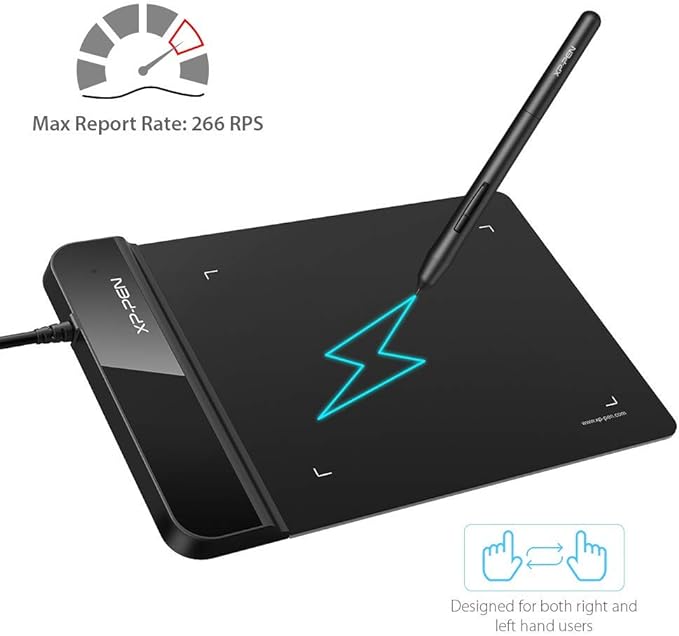
Drawing Tablet XPPen G430S OSU, Graphic Drawing Tablet with 8192 Levels Pressure Battery-Free Stylus, 4 x 3 inch Ultrathin, for OSU Game, Online
85% of respondents would recommend this to a friend
 3 Sustainability Highlights
Item #:
89151007
TTD 206
Price Details
Excluding Shipping & Custom charges ( Shipping and custom charges will be calculated on checkout )
*All items will import from US
In stock
 Imported from USA store
QTY:
Order now and get it around Tuesday, September 29
Secured transaction
Ubuy works hard to protect your security and privacy. Our advanced payment security system ensures confidentiality by encrypting your information during transmission using AES (Advanced Encryption Standards) and SSL (Secure Socket Layer) protocols. Your payment details are 100% secure as we do not share your payment details with third party sellers.
Our Top Logistics Partners


Providing you with groundbreaking control and fluidity to expand your creative output.

Fast
Shipping

Free
Return*

Secure Packaging

100% Original Products

PCI DSS Compliance

ISO 27001 Certified



What Stands Out
Battery-Free Stylus
Enjoy endless creativity with the battery-free stylus, eliminating the need for charging while providing an authentic drawing experience.
8192 Levels Pressure
Achieve precise control with 8192 levels of pressure sensitivity, allowing for delicate strokes and bold lines in your artistic endeavors.
Compact Design
The ultrathin 4 x 3 inch size makes it highly portable and convenient for on-the-go use, perfect for both gamers and educators.
Product Details
| Brand | XP-Pen |
| Model Name | Star G430S |
| Built-In Media | Tablet, Passive Pen, Quick Guide, Replacement Nibs, Pen-Clipper |
| Target Audience | Teacher |
| Model Number | StarG430 |
| Number of Items | 1 |
| Manufacturer | XP-PEN |
| UPC | 602258815575 |
| Unit Count | 1 Count |
| External Testing Certification | Não aplicável |
| Mfr Part Number | StarG430 |
| Connectivity Technology | USB |
| Pressure Sensitivity | 8192 levels |
| Operating System | Windows 7 and above, Mac OS X version 10.10 or later |
| Additional Features | Stylus |
| Specific Uses For Product | OSU Game, Online Teaching, remote working |
| Compatible Devices | Windows 7 and above, Mac OS X 10.10 (or later) |
| Display Type | LED |
| Native Resolution | 5080 line_per_inch (12903.2 cm) |
| Screen Size | 4 inches (10.2 cm) |
| Item Dimensions L x W | 4.21"L x 5.12"W (10.7 cm) |
| Active Surface Area | 4 x 3 inch (10.2 cm) |
| Color | Black |
| Special Feature | Stylus |
| Package Weight | 1.27 Pound |
Dangerous Goods
To avoid the delay in customs clearance process for Dangerous Goods, the shipment shall be opened at our warehouse facility to check the severity of hazardous components. Please see the list of Dangerous goods here.
What's in the box
Tablet, Passive Pen, Quick Guide, Replacement Nibs, Pen-Clipper
Who Should Buy?

-
OSU Game Players
Ideal for OSU players seeking precision and responsiveness in their gameplay using a compact drawing tablet.
-
Online Educators
Perfect for teachers conducting online classes, allowing easy annotation and drawing during lessons on Windows and Mac.
-
Portable Creatives
Great choice for artists needing a lightweight and portable device for sketching and graphic design on-the-go.

-
Professional Artists
May not meet the needs of professional artists requiring larger drawing surfaces and advanced features for detailed work.
Product Description
Sustainability Highlights
This product has sustainability features recognized by trusted certifications.
Recycled materials
Contains at least 50% recycled material. As certified by
Global Recycled Standard (GRS) certified products contain recycled content that has been independently verified at each stage of the supply chain, from the source to the final product and meet social, environmental, and chemical requirements. The purchase of Global Recycled Standard (GRS) certified products supports the use of recycled content in the supply chain. A product must contain at least 50% certified GRS material to qualify for inclusion in Climate Pledge Friendly. Learn more about this certification
- Certification Body
- Bureau Veritas
- Certification Number
- TE-00336469
Safer chemicals
Made with chemicals safer for human health and the environment. As certified by
Global Recycled Standard (GRS) certified products contain recycled content that has been independently verified at each stage of the supply chain, from the source to the final product and meet social, environmental, and chemical requirements. The purchase of Global Recycled Standard (GRS) certified products supports the use of recycled content in the supply chain. A product must contain at least 50% certified GRS material to qualify for inclusion in Climate Pledge Friendly. Learn more about this certification
- Certification Body
- Bureau Veritas
- Certification Number
- TE-00336469
Worker well-being
Manufactured on farms or in facilities that protect the rights and/or health of workers. As certified by
Global Recycled Standard (GRS) certified products contain recycled content that has been independently verified at each stage of the supply chain, from the source to the final product and meet social, environmental, and chemical requirements. The purchase of Global Recycled Standard (GRS) certified products supports the use of recycled content in the supply chain. A product must contain at least 50% certified GRS material to qualify for inclusion in Climate Pledge Friendly. Learn more about this certification
- Certification Body
- Bureau Veritas
- Certification Number
- TE-00336469
Have any Query? Chat with us
Customer Questions & Answers
-
Question:
What are the main features of the XPPen G430S drawing tablet?
Answer: The XPPen G430S features an ultrathin design, measuring just 4 x 3 inches, making it highly portable and ideal for gamers and artists on the go. Its 8192 levels of pressure sensitivity allow for precise control, mimicking the subtle variations of traditional drawing. Additionally, the battery-free stylus eliminates the need for charging, ensuring uninterrupted use. This combination of features makes it an excellent choice for OSU gaming and digital artistry. -
Question:
Is the XPPen G430S compatible with different operating systems?
Answer: Yes, the XPPen G430S is compatible with a wide range of operating systems, including Windows and macOS. This versatility allows users to utilize the tablet with various creative software and applications. Additionally, it supports OSU game, which is widely popular among gamers. This unique compatibility makes it a suitable option for both casual and professional users looking for a reliable drawing tablet. -
Question:
Can I use the XPPen G430S for purposes other than gaming?
Answer: Absolutely! While the XPPen G430S is designed with OSU gaming in mind, it is also an excellent tool for digital artists, illustrators, and graphic designers. Its high-pressure sensitivity levels provide flexibility in creating detailed artwork and designs. Users can create everything from sketches to complex illustrations, making it a versatile choice for anyone involved in digital creativity. -
Question:
How does pressure sensitivity enhance drawing experience?
Answer: The 8192 levels of pressure sensitivity allow the stylus to detect varying levels of pressure applied by the user, providing a natural drawing experience. This sensitivity helps artists to create fine lines or bold strokes with ease, letting them express their creativity more effectively. It is especially beneficial for tasks requiring precision, such as shading and creating textures in digital art. -
Question:
What are the advantages of a battery-free stylus?
Answer: A battery-free stylus offers several advantages, including the convenience of never needing to charge or replace batteries. This allows for uninterrupted workflow, making it ideal for extended use during intense gaming sessions or lengthy art projects. Furthermore, battery-free technology typically results in a lighter and more comfortable stylus, increasing usability and reducing arm fatigue over time. -
Question:
How do I set up the XPPen G430S drawing tablet?
Answer: Setting up the XPPen G430S is straightforward. You simply need to connect the tablet to your computer via USB, and install the necessary drivers from the XPPen website. Once installed, you can customize the tablet settings and calibrate the stylus according to your preferences. This simple setup allows users to begin drawing or playing games like OSU without hassle. -
Question:
Is the XPPen G430S suitable for beginners in digital art?
Answer: Yes, the XPPen G430S is excellent for beginners due to its user-friendly features and portability. Its intuitive design makes it easy for new users to adapt to digital drawing. The pressure sensitivity control aids beginners in mastering techniques, allowing for gradual improvement in their skills. Many aspiring digital artists find it to be a valuable starting point in their creative journey. -
Question:
Can I customize the express keys on the XPPen G430S?
Answer: Yes, the XPPen G430S comes with programmable express keys that can be customized to suit your workflow. Users can assign specific functions, such as undo or zoom, allowing for a more efficient and personalized experience during drawing or gaming sessions. Customizing these keys helps streamline tasks and improves overall productivity, making them a beneficial feature for frequent users. -
Question:
What type of software is compatible with the XPPen G430S?
Answer: The XPPen G430S is compatible with various software, including popular applications like Adobe Photoshop, Illustrator, CorelDRAW, and OSU. This wide compatibility allows users to engage in a range of creative activities, from professional graphic design to casual gaming. It’s suitable for artists and gamers who prefer flexibility in their software choices. -
Question:
Where can I buy the XPPen G430S drawing tablet online in Trinidad and Tobago?
Answer: You can purchase the XPPen G430S drawing tablet online in Trinidad and Tobago at Ubuy. Ubuy offers a convenient shopping experience, along with a range of products and potential deals. You can browse their selection to find the XPPen G430S and enjoy their customer service as you shop for this innovative drawing tablet.
XP-Pen Graphics Tablets StarG430 Editorial Review


Drawing Tablet XPPen G430S OSU, Graphic Drawing Tablet with 8192 Levels Pressure Battery-Free Stylus, 4 x 3 inch Ultrathin, for OSU Game, Online Teaching Compatible with Window/Mac Black is a compact and versatile tool that has garnered attention for its effectiveness in various applications. Users have praised its size, as it easily fits in limited spaces, making it ideal for digital nomads and students. The tablet's 8192 pressure levels ensure great sensitivity, vital for both drawing and marking up designs. However, some have noted minor jitter in the upper left corner, and the tablet requires periodic resets after waking from sleep, though this doesn't overshadow its remarkable performance for both professionals and beginners alike.
Customer Reviews & Ratings
9992 customers ratings
-
5 Star
62%
-
4 Star
17%
-
3 Star
11%
-
2 Star
4%
-
1 Star
6%
Review this product
Share your thoughts with other customers
Pros
- 8192 levels of pressure sensitivity for precise input
- Compact size fits perfectly in small spaces
- Battery-free stylus requires no additional batteries
- Customizable function buttons enhance productivity
- Perfect for digital nomads and on-the-go use
Cons
- Software may require occasional resets after waking up.
Platform Trust & Buyer Confidence

JK
Jasmin
Verified buyer
“Great products and very good service: very easy and very fast international delivery.”
9 September 2026 · via Trustpilot
AG
Anke
Verified buyer
“Wonderful online shopping experience, smooth transaction from the start. Payment method works conveniently and delivery is unexpectedly fast and reliable. You go the extra mile for service. What makes this even more amazing, you deliver to Namibia. I will remain a happy Ubuy customer and will increase my purchases for sure! Thank you!”
10 September 2026 · via Trustpilot
H
Hazel
Verified buyer
“Very easy to find the products what you need, and so fast delivery, that’s why I highly recommended to others costumers to used ubuy.”
10 September 2026 · via Trustpilot
O
Opaleye
Verified buyer
“I received exactly what I ordered I was skeptical about your site because that was my first time to order. But the order came timely and neatly packaged. I was not disappointed. Thank you.”
11 September 2026 · via Trustpilot
AC
Adele
Verified buyer
“Easy to find and order what you want on the website. Delivery is quick to the UK”
8 September 2026 · via Trustpilot
Secure Checkout
Global Delivery
Easy Returns
Genuine Products
Product Price History
Important information
- Limitations : For products shipped internationally, please note that any manufacturer warranty may not be valid; manufacturer service options may not be available; product manuals, instructions, and safety warnings may not be in destination country languages; the products (and accompanying materials) may not be designed in accordance with destination country standards, specifications, and labeling requirements; and the products may not conform to destination country voltage and other electrical standards (requiring use of an adapter or converter if appropriate). The recipient is responsible for assuring that the product can be lawfully imported to the destination country. When ordering from Ubuy or its affiliates, the recipient is the importer of record and must comply with all laws and regulations of the destination country.
- Not all the products listed on Ubuy are for sale, as Ubuy is a global search engine. Products are subject to export/trade regulations.
TTD 206
Order now and get it around Tuesday, September 29
This item is not restrict in my country.(Please click on above link if this item is not restrict in your country, So our team will review and allow.)
QTY:
Secured transaction
PCI DSS compliant and ISO 27001:2022 certified, with encrypted payments and full buyer protection on every order.
Our Top Logistics Partners
Fastest cross-border delivery
Features & Benefits
- Designed specifically for OSU! gameplay and digital creativity.
- Active area of 4 x 3 inches with 8192 levels of pen pressure sensitivity.
- Battery-free stylus ensures uninterrupted drawing with smooth lines.
- Ultra-thin design at only 2 mm thick, perfect for portability.
- Compatible with major operating systems including Windows and Mac.
- Supports both right and left-handed users with customizable settings.
Ubuy Assurance
Experience worry-free shopping with 100% original products, PCI DSS-compliant payment security, ISO 27001-certified data protection, the fastest cross-border delivery, free returns *, and secure packaging on every order.