- Home Page /
- Electronics /
- Computer Accessories /
- Networking Products /
- Routers /
- TP-Link AX3000 Wall-Mounted Wi-Fi 6 Router Ar...
0 ratings








Item #:
97297803
TP-Link AX3000 Wall-Mounted Wi-Fi 6 Router Archer Air R5 | Ultra-Thin & Compact | Dual Band Wi-Fi | Smart Beamforming Antennas | EasyMesh Compatible
Item #:
97297803
TTD 889
Price Details
Excluding Shipping & Custom charges ( Shipping and custom charges will be calculated on checkout )
*All items will import from US
In stock
 Imported from USA store
QTY:
Order now and get it around Saturday, June 27
Secured transaction
Ubuy works hard to protect your security and privacy. Our advanced payment security system ensures confidentiality by encrypting your information during transmission using AES (Advanced Encryption Standards) and SSL (Secure Socket Layer) protocols. Your payment details are 100% secure as we do not share your payment details with third party sellers.
Our Top Logistics Partners


Experience extended Wi-Fi coverage and seamless connections with the Archer Air E5, delivering exceptional performance with 2402 Mbps throughput on the 5GHz band and 574 Mbps on the 2.4GHz band.

Fast
Shipping

Free
Return*

Secure Packaging

100% Original Products

PCI DSS Compliance

ISO 27001 Certified


What Stands Out
Space-Saving Design
The ultra-thin and compact design allows for easy wall mounting, ensuring it fits seamlessly into any environment while saving valuable space.
Extended Coverage
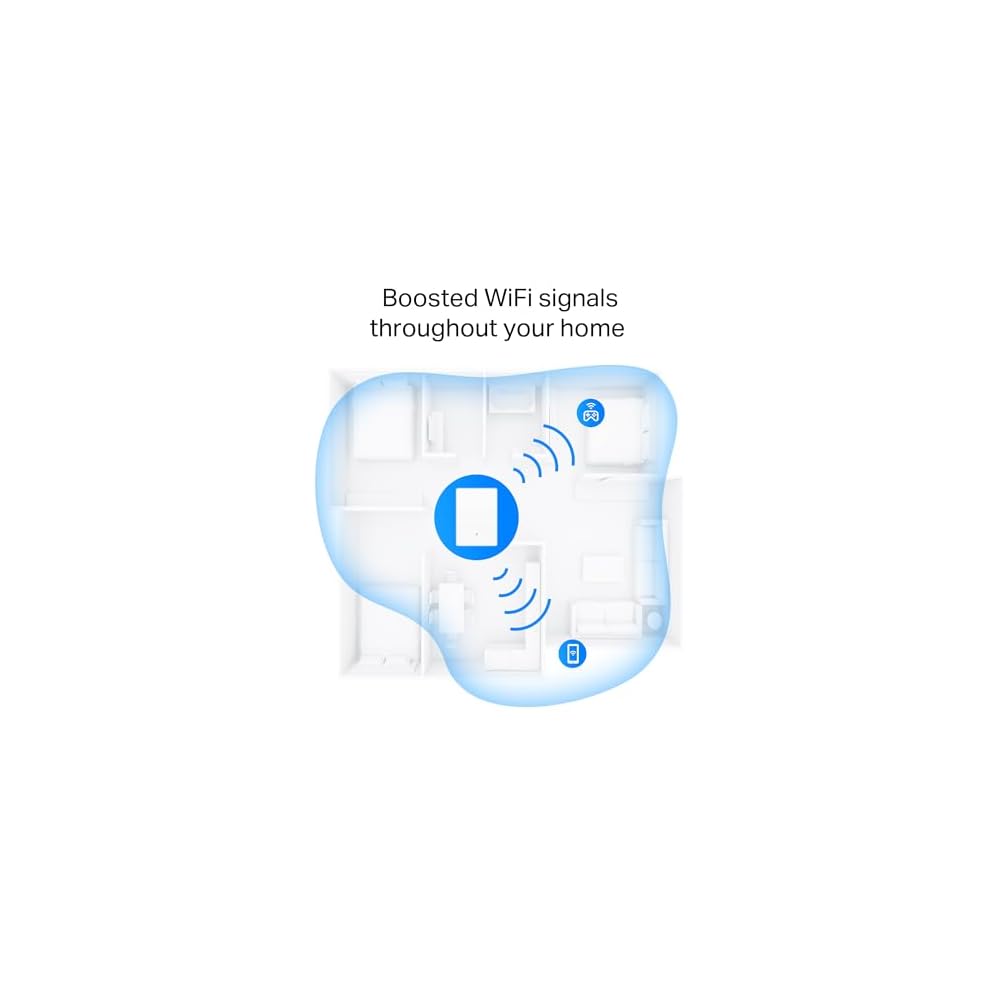
Offers up to 2,700 sq. ft. coverage, effectively eliminating dead zones and ensuring strong Wi-Fi signals throughout larger areas, perfect for homes and offices.
Enhanced Performance
Utilizes dual-band technology and Smart Beamforming antennas for optimized connections and improved speeds, providing a reliable and seamless internet experience for multiple devices.
Product Details
- 𝐃𝐮𝐚𝐥 𝐁𝐚𝐧𝐝 𝐖𝐢-𝐅𝐢 𝟔 - Stream, game, and work, all at once. Air R5's AX3000 Wi-Fi 6 and wide bandwidth delivers lag-free performance for everyone.
- 𝐌𝐢𝐧𝐢𝐦𝐚𝐥𝐢𝐬𝐭 𝐃𝐞𝐬𝐢𝐠𝐧, 𝐌𝐚𝐱 𝐏𝐞𝐫𝐟𝐨𝐫𝐦𝐚𝐧𝐜𝐞 - Thinner than a standard wall outlet, the sleek and compact design of Archer R5 will blend effortlessly into your modern home.
- 𝐌𝐨𝐮𝐧𝐭 𝐨𝐧 𝐀𝐧𝐲 𝐖𝐚𝐥𝐥 - Eliminate cable clutter and reclaim valuable surfaces. Dual 3M adhesive pads and a dedicated plastic bracket accommodates both wall and desk mounting.
- 𝐒𝐦𝐚𝐫𝐭 𝐁𝐞𝐚𝐦𝐟𝐨𝐫𝐦𝐢𝐧𝐠 𝐀𝐧𝐭𝐞𝐧𝐧𝐚𝐬 - No more Wi-Fi dead zones. Built-in smart antennas adapt to your connected devices ensuring optimal signal everywhere, even as you move from room to room.
- 𝐂𝐫𝐞𝐚𝐭𝐞 𝐖𝐡𝐨𝐥𝐞-𝐇𝐨𝐦𝐞 𝐌𝐞𝐬𝐡 𝐖𝐢-𝐅𝐢 - Through its EasyMesh compatibility, enables seamless integration with other EasyMesh routers to eliminate dead zones and extend coverage. We recommend pairing with Archer Air E5 for an even better network experience
- 𝐖𝐢𝐫𝐞𝐝 𝐂𝐨𝐧𝐧𝐞𝐜𝐭𝐢𝐯𝐢𝐭𝐲 - Equipped with two Gigabit Ethernet WAN/LAN ports, the Archer Air R5 caters to both internet access and wired device integration.
- 𝐓𝐏-𝐋𝐢𝐧𝐤 𝐇𝐨𝐦𝐞𝐒𝐡𝐢𝐞𝐥𝐝 - With HomeShield, you can enjoy peace of mind knowing your network and all connected devices are protected by industry-leading security protocols and real-time threat detection.
- 𝐕𝐏𝐍 𝐒𝐞𝐫𝐯𝐞𝐫: 𝐌𝐨𝐫𝐞 𝐆𝐫𝐚𝐧𝐮𝐥𝐚𝐫 𝐕𝐏𝐍 𝐅𝐮𝐧𝐜𝐭𝐢𝐨𝐧 𝐔𝐬𝐚𝐠𝐞 - Empowers you to access your home network securely from anywhere with its built-in VPN server. It allows external devices, including remote desktops, NAS, printers, and camera feeds, to connect through a secure tunnel, shielding your data and privacy.
- 𝐄𝐚𝐬𝐲 𝐒𝐞𝐭𝐮𝐩 𝐚𝐧𝐝 𝐌𝐚𝐧𝐚𝐠𝐞𝐦𝐞𝐧𝐭 - Set up and manage your router in minutes with the free Tether App available for both Android and iOS devices.
| Other Special Features of the Product | Beamforming, Guest Mode, Internet Security, Parental Control, Remote Access |
| Frequency Band Class | Dual-Band |
| Wireless Compability | 802.11ac, 802.11ax, 802.11n |
| Compatible Devices | Personal Computer, Security Camera, Smart Television, Smartphone, Tablet |
| Antenna Location | Home |
| Connectivity Technology | Wi-Fi |
| Antenna Type | Fixed |
| Operating System | Linux-based (customized) |
| Security Protocol | WPA-PSK, WPA2-PSK, WPA3 |
| Number of Ports | 3 |
| Control Method | App, Remote |
| Data Transfer Rate | 3000 Gigabits Per Second |
| LAN Port Bandwidth | 10/100/1000 Mbps |
| Maximum Upstream Data Transfer Rate | 1500 Megabits Per Second |
| Number of Antennas | 3 |
| Router Firewall Security Level | Moderate |
| Wi-Fi Generation | Wi-Fi 6 |
| Has Internet Connectivity | Yes |
| Router Network Type | wireless |
| Is Modem Compatible | Yes |
| Connectivity Protocol | Wi-Fi |
| Coverage | whole home or extended |
| Controller Type | App Control |
| Frequency | 5 GHz |
| Brand | TP-Link |
| Model Name | Archer Air R5 |
| Built-In Media | Archer Air R5, Gigabit Network Cable, Plastic Bracket & Installation Accessories, Power Adapter, Quick Installation Guide |
| Model Number | Archer Air R5 |
| UPC | 840030705175 |
| Manufacturer | TP-Link |
| Mfr Part Number | Archer Air R5 |
| Unit Count | 1.0 Count |
| Item Weight | 0.64 Pounds (290 grams) |
| Color | White |
| Has Security Updates | Yes |
| Special Feature | Beamforming, Guest Mode, Internet Security, Parental Control, Remote Access |
| Wireless Communication Standard | 802.11ac, 802.11ax, 802.11n |
| Recommended Uses For Product | Home |
| Included Components | Archer Air R5, Gigabit Network Cable, Plastic Bracket & Installation Accessories, Power Adapter, Quick Installation Guide See more |
Who Should Buy?

-
Small Homes
Ideal for small houses needing an extended Wi-Fi range in hard-to-reach areas without clutter.
-
Home Offices
Perfect for remote workers requiring reliable internet connectivity throughout their home office space.
-
Gaming Enthusiasts
Gamers will benefit from a solid connection with minimal lag thanks to dual-band performance and smart antennas.

-
Large Houses
Not suitable for larger homes as it may not cover extensive spaces effectively beyond 2,700 sq. ft.
-
Heavy Users
Users with intense streaming or simultaneous device operations might experience bandwidth limitations in crowded situations.
-
Non-Tech Savvy
Individuals unfamiliar with tech may find setup and optimal placement challenging despite included mounting materials.
Product Description
Have any Query? Chat with us
Customer Questions & Answers
-
Question:
What are the key features of the TP-Link AX3000 Wall-Mounted Wi-Fi 6 Router Archer Air R5?
Answer: The TP-Link AX3000 features Wi-Fi 6 technology, which provides faster speeds, increased capacity, and improved performance in crowded environments. Additionally, its ultra-thin and compact design allows for easy wall mounting, saving space. Equipped with dual-band Wi-Fi, it supports both 2.4GHz and 5GHz frequencies for optimal connectivity. The Smart Beamforming antennas enhance signal strength and coverage, while EasyMesh technology allows seamless integration with other compatible devices for a unified network experience. -
Question:
How does the Smart Beamforming feature work?
Answer: Smart Beamforming technology optimizes the direction of your Wi-Fi signals toward connected devices, rather than broadcasting in all directions equally. This results in focused coverage, reduced dead zones, and a stronger signal, even at longer distances. For instance, in a multi-room home, you will experience faster speeds and more stable connections in areas that typically struggle with Wi-Fi coverage. -
Question:
What is EasyMesh and how does it benefit my home network?
Answer: EasyMesh technology allows you to expand your network coverage by connecting multiple TP-Link routers to create a single, unified Wi-Fi network. This means you can enjoy seamless connectivity as you move throughout your home, without having to switch between different networks. It’s particularly beneficial for larger homes or spaces with obstacles that can disrupt Wi-Fi signals, ensuring you maintain a strong connection in every room. -
Question:
Can this router be used with multiple devices at once?
Answer: Yes, the TP-Link AX3000 Wi-Fi 6 Router is designed to handle multiple devices simultaneously without sacrificing performance. Thanks to its advanced technology, this router can efficiently manage data from various devices, such as smartphones, laptops, smart TVs, and IoT devices. Whether hosting a video call while streaming a movie or playing online games, you won't notice a dip in speed or connectivity. -
Question:
Is the installation process of the TP-Link AX3000 easy?
Answer: Absolutely! The installation of the TP-Link AX3000 is designed to be user-friendly. You can set it up using the TP-Link Tether app or a web browser within minutes. The app guides you through the process with simple steps, ensuring you can quickly get your network up and running, even if you're not tech-savvy. This ease of installation makes it ideal for users looking to enhance their home network without hassle. -
Question:
What kind of internet connection do I need for this router?
Answer: The TP-Link AX3000 router is compatible with most broadband internet services, including DSL, cable, and fiber connections. It works effectively with speeds accommodating high-demand use cases like 4K streaming, gaming, and video conferencing. For the best performance, ensure your internet plan aligns with the capabilities of the router, so you fully utilize its advanced features and maximize your online experience. -
Question:
Does the TP-Link AX3000 support VPN usage?
Answer: Yes, the TP-Link AX3000 supports VPN functionality, allowing you to create a secure connection to your private network over the internet. This feature is ideal for users who require secure remote access to their home or office network. It enhances privacy while you browse online or access restricted content, making it suitable for telecommuting or secure browsing. -
Question:
Can this router be used for gaming?
Answer: The TP-Link AX3000 is an excellent choice for gaming due to its high-speed capabilities and Wi-Fi 6 technology. It allows for low-latency connections, ensuring that your gaming sessions are smooth and uninterrupted. Whether you're playing online multiplayer games or streaming your gameplay, this router is designed to handle high data transmissions efficiently, providing an enhanced gaming experience. -
Question:
What is the warranty period for the TP-Link AX3000?
Answer: TP-Link typically offers a limited warranty for their products, including the AX3000 router, which often spans around 2 years. This warranty covers defects in materials and workmanship under normal use conditions. Customers are encouraged to register their product on the TP-Link website for easier access to support and warranty service, ensuring peace of mind when choosing your router. -
Question:
Where can I buy the TP-Link AX3000 Wall-Mounted Wi-Fi 6 Router Archer Air R5?
Answer: You can conveniently purchase the TP-Link AX3000 Wall-Mounted Wi-Fi 6 Router Archer Air R5 from Ubuy. They provide a reliable platform for purchasing quality tech products and often feature special promotions. By visiting Ubuy, you can find this router and enjoy a seamless shopping experience tailored to meet your needs.
TP-Link Routers Archer Air R5 Editorial Review


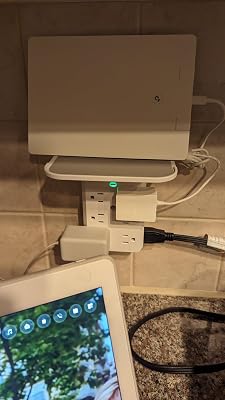


**** Customers generally find the TP-Link extenders to be user-friendly, especially those who already own a TP-Link router. The setup process is typically described as straightforward, allowing users to simply peel and stick the devices where needed. However, some users have encountered challenges, particularly regarding the integration of guest networks and printer connections. One user reported success in improving coverage by replacing the original adhesive with Command strips, which allowed for a cleaner installation without damaging walls. However, the experience was marred by missing parts and difficulties in achieving a 'mesh' network configuration while keeping devices, like security cameras, segregated on a guest network. The frustration escalated for another user who struggled with printer connectivity following the installation of the extenders. They found it cumbersome to troubleshoot and restore printer functionality, which required several resets and a seemingly unrelated solution of toggling Bluetooth settings on their computer to resolve the issue. Despite these hurdles, product performance seems to stand out positively, with many users eventually reporting strong signals and improved network coverage after installation. However, there is a clear desire for TP-Link to enhance their software capabilities, especially around mesh networking in conjunction with guest networks. **
Customer Reviews & Ratings
25 customers ratings
-
5 Star
70%
-
4 Star
0%
-
3 Star
6%
-
2 Star
10%
-
1 Star
14%
Review this product
Share your thoughts with other customers
Pros
- Generally easy setup process for existing TP-Link router users.
- Effective signal strength and improved coverage reported.
- Flexible mounting options (Command strips suggested).
Cons
- Inability to create a mesh network while using guest and main networks simultaneously.
Product Price History
Important information
- Limitations : For products shipped internationally, please note that any manufacturer warranty may not be valid; manufacturer service options may not be available; product manuals, instructions, and safety warnings may not be in destination country languages; the products (and accompanying materials) may not be designed in accordance with destination country standards, specifications, and labeling requirements; and the products may not conform to destination country voltage and other electrical standards (requiring use of an adapter or converter if appropriate). The recipient is responsible for assuring that the product can be lawfully imported to the destination country. When ordering from Ubuy or its affiliates, the recipient is the importer of record and must comply with all laws and regulations of the destination country.
- Not all the products listed on Ubuy are for sale, as Ubuy is a global search engine. Products are subject to export/trade regulations.
TTD 889
Order now and get it around Saturday, June 27
This item is not restrict in my country.(Please click on above link if this item is not restrict in your country, So our team will review and allow.)
QTY:
Secured transaction
Ubuy works hard to protect your security and privacy. Our advanced payment security system ensures confidentiality by encrypting your information during transmission using AES (Advanced Encryption Standards) and SSL (Secure Socket Layer) protocols. Your payment details are 100% secure as we do not share your payment details with third party sellers.
Our Top Logistics Partners
Fastest cross-border delivery
Features & Benefits
- Boosts Wi-Fi coverage for seamless connectivity throughout your home.
- Delivers impressive speeds of 2402 Mbps (5GHz) and 574 Mbps (2.4GHz).
- Features a minimalist design that integrates beautifully into any decor.
- Flexible mounting options available: wall or desk with included accessories.
- Smart antennas eliminate dead zones by adapting to device locations.
- Compatible with EasyMesh for a whole-home mesh Wi-Fi network.