- Home Page /
- Electronics /
- Computer Accessories /
- Computer Accessories & Peripherals /
- Input Devices /
- Graphics Tablets /
- XPPen Artist Pro 14 Gen2 Drawing Tablet with ...
0 ratings





Item #:
79970068
XPPen Artist Pro 14 Gen2 Drawing Tablet with Screen 14 inch Graphic Art Tablet with Full Laminated Anti-Glare Screen 16384 Pressure Levels X3 Pro
88% of respondents would recommend this to a friend
 3 Sustainability Highlights
Item #:
79970068
TTD 2597
Price Details
Excluding Shipping & Custom charges ( Shipping and custom charges will be calculated on checkout )
*All items will import from US
25%
In stock
 Imported from USA store
QTY:
Order now and get it around Wednesday, August 19
Secured transaction
Ubuy works hard to protect your security and privacy. Our advanced payment security system ensures confidentiality by encrypting your information during transmission using AES (Advanced Encryption Standards) and SSL (Secure Socket Layer) protocols. Your payment details are 100% secure as we do not share your payment details with third party sellers.
Our Top Logistics Partners


Industry-first 16K pressure levels, enhanced color coverage, and strong compatibility make the XPPen Artist Pro 14 Gen2 a game-changer in the digital art world.

Fast
Shipping

Free
Return*

Secure Packaging

100% Original Products

PCI DSS Compliance

ISO 27001 Certified


What Stands Out
High Sensitivity
Experience incredible detail with 16,384 pressure levels. The XP-Pen Artist Pro 14 Gen 2 allows for nuanced and precise strokes, perfect for professional artists and designers seeking fine control in their creations.
Anti-Glare Screen
The fully laminated anti-glare screen minimizes reflections, ensuring your focus remains on your artwork. This feature enhances visibility in various lighting conditions, allowing for a comfortable drawing experience anywhere.
Versatile Stand
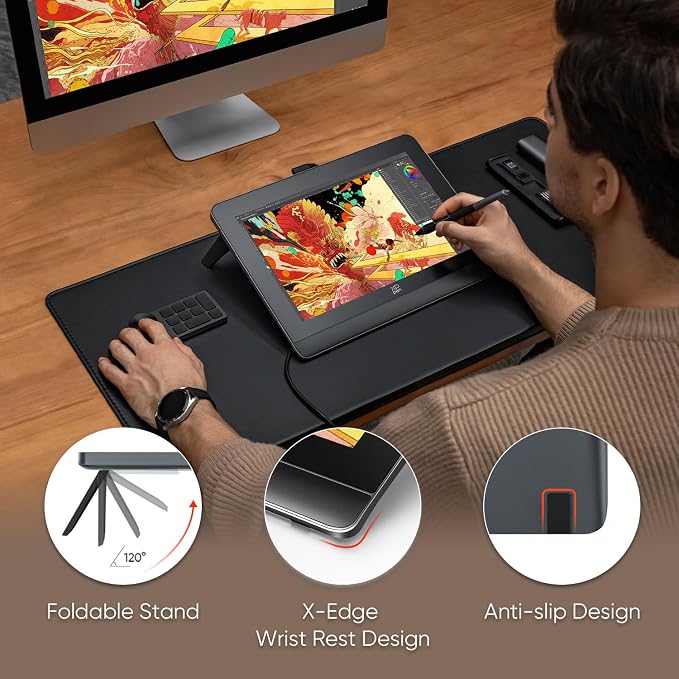
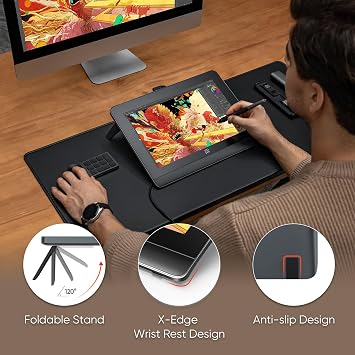
Includes a flexible tilt stand for customizable angles, promoting ergonomic comfort. Coupled with a mini keydial for efficient shortcuts, this feature enhances workflow efficiency, making it ideal for long creative sessions.
Product Details
- PLEASE NOTE: The XPPen Artist Pro 14 Gen2 needs to connect with a computer to use. You need to use it with your Computer or Laptop. IT IS NOT A STANDALONE DRAWING TABLET
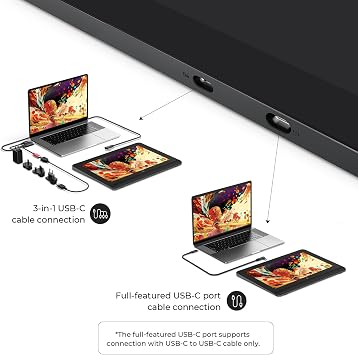
- The 3 in 1 cable is included. It is in a little white box separately in the package
- 16K Pressure Sensitive: XPPen Artist Pro 14 Gen2 drawing tablet introducing X3 Pro smart chip stylus is a breakthrough innovation boasting industry-first 16K pressure levels, 100%* higher than that of its peers. It delivers much more precise and smooth lines than ever before, excelling at hyper-nuanced creation, a game-changer in details
- Full Laminated Anti-glare Screen: The 14-inch graphic tablet's display adopts full laminated technology, anti-glare etched glass, 16:10 aspect ratio, wide angle of 178°, which all will help you avoid parallax errors between the stylus nib and cursor, precisely positioning every single one of your strokes. TÜV SÜD certified optimizes eye comfort by reducing potentially harmful blue light emissions while delivering excellent color accuracy
- Enhanced and Brilliant color coverage: 99% sRGB color gamut coverage and 123% sRGB color gamut area ratio, △E <2.2 high color accuracy, let you create boldly in stunning color accuracy and detail. Every piece of content becomes a feast to look at and comes to life exactly what you imagine
- The Artist Pro 14 Gen2 Pen Display Features: A built-in Foldable Stand lets you get your preferred working posture by spreading it; A Wireless Shortcut Remote lets you get easier access to functions to make quick changes; X-Edge Wrist Rest is ergonomic and smooth, letting you combat the tension and fatigue of the wrist that could be produced due to hours of work on end
- Strong Compatibility: The 14-inch graphic monitor with screen is compatible with Windows 7 (or later), macOS 10.10 (or later), Android (USB3.1 DP1.2), Chrome OS 88 (or later), and Linux. Bring more possibilities to your creation. It also supports popular digital art software such as Adobe Photoshop, Illustrator, SAI, CDR, GIMP, Krita, MediBang, FireAlpaca, Toonboom, Maya, Blender3D, etc
- One-click to switch from display to tablet: The Artist Pro 14 Gen2 drawing monitor supports drawing tablet mode. Just need to long press the power button for 3 seconds, and it will flash in blue and orange alternately. When the screen is off, you're getting a drawing tablet
| Brand | XP-Pen |
| Model Name | Artist Pro 14 Gen2 |
| Built-In Media | 3 in 1 cable |
| Target Audience | Student, Teacher |
| Model Number | MD140FH |
| Manufacturer | XP-PEN |
| Color | Black |
| Connectivity Technology | HDMI, USB-C to USB-C |
| Pressure Sensitivity | 16384 levels |
| Operating System | Android (USB3.1 DP1.2), Chrome OS 88 (or later), Linux, MacOS 10.10 (or later), Windows 7 (or later) |
| Additional Features | 60° Tilt Support, Anti-Glare Glass, Full Lamination, Shortcut Key, X3 Pro Stylus |
| Specific Uses For Product | 3D Modelling, Animation, Drawing |
| Compatible Devices | Desktop, Laptop, Tablet |
| Display Type | LCD |
| Native Resolution | 1920x1200 |
| Screen Size | 14 inches (35.6 cm) |
| Active Surface Area | 298.94 X 186.84 mm |
| Special Feature | 60° Tilt Support, Anti-Glare Glass, Full Lamination, Shortcut Key, X3 Pro Stylus |
| Item Weight | 2.7 lbs (1.22 kg) |
Dangerous Goods
To avoid the delay in customs clearance process for Dangerous Goods, the shipment shall be opened at our warehouse facility to check the severity of hazardous components. Please see the list of Dangerous goods here.
What's in the box
3 in 1 cable
Who Should Buy?

-
Digital Artists
Perfect for digital artists seeking a responsive tablet with high pressure sensitivity and a quality display for artwork.
-
Graphic Designers
Ideal for graphic designers needing precision and color accuracy with features like 123% sRGB for detailed work.
-
Students & Beginners
Great for students and beginners who require an affordable yet feature-rich tablet for learning and practicing digital art.

-
Mobile Creatives
Not suitable for users requiring portability due to its size and need for a separate computer to function.
Product Description
Sustainability Highlights
This product has sustainability features recognized by trusted certifications.
Recycled materials
Contains at least 50% recycled material. As certified by
Global Recycled Standard (GRS) certified products contain recycled content that has been independently verified at each stage of the supply chain, from the source to the final product and meet social, environmental, and chemical requirements. The purchase of Global Recycled Standard (GRS) certified products supports the use of recycled content in the supply chain. A product must contain at least 50% certified GRS material to qualify for inclusion in Climate Pledge Friendly. Learn more about this certification
- Certification Body
- Bureau Veritas
- Certification Number
- TE-00336469
Safer chemicals
Made with chemicals safer for human health and the environment. As certified by
Global Recycled Standard (GRS) certified products contain recycled content that has been independently verified at each stage of the supply chain, from the source to the final product and meet social, environmental, and chemical requirements. The purchase of Global Recycled Standard (GRS) certified products supports the use of recycled content in the supply chain. A product must contain at least 50% certified GRS material to qualify for inclusion in Climate Pledge Friendly. Learn more about this certification
- Certification Body
- Bureau Veritas
- Certification Number
- TE-00336469
Worker well-being
Manufactured on farms or in facilities that protect the rights and/or health of workers. As certified by
Global Recycled Standard (GRS) certified products contain recycled content that has been independently verified at each stage of the supply chain, from the source to the final product and meet social, environmental, and chemical requirements. The purchase of Global Recycled Standard (GRS) certified products supports the use of recycled content in the supply chain. A product must contain at least 50% certified GRS material to qualify for inclusion in Climate Pledge Friendly. Learn more about this certification
- Certification Body
- Bureau Veritas
- Certification Number
- TE-00336469
Have any Query? Chat with us
Related Searches
Customer Questions & Answers
-
Question:
What features make the XPPen Artist Pro 14 Gen2 an excellent choice for artists?
Answer: The XPPen Artist Pro 14 Gen2 stands out due to its Full Laminated Anti-Glare Screen that reduces reflections, making it easier to work in various lighting conditions. It offers an impressive 16384 pressure levels with the X3 Pro Battery-Free Stylus, allowing for highly detailed and nuanced artistry. Additionally, its 123% sRGB color gamut ensures vibrant and accurate colors for your digital artworks. Whether you're sketching, painting, or designing, this tablet provides a professional-grade experience that caters to both amateur and seasoned artists alike. -
Question:
How does the pressure sensitivity feature enhance my drawing experience?
Answer: The XPPen Artist Pro 14 Gen2's 16384 pressure levels significantly improve your drawing precision, allowing for a seamless transition between thick and thin lines with just a slight variation in pressure. This sensitivity enables artists to replicate traditional brush techniques and achieve intricate details or subtle shading in a digital format. Whether you’re illustrating characters or creating complex landscapes, this feature offers an intuitive feel that can enhance your overall workflow. -
Question:
Is the XPPen Artist Pro 14 Gen2 compatible with software like Adobe Photoshop?
Answer: Yes, the XPPen Artist Pro 14 Gen2 is fully compatible with popular design software such as Adobe Photoshop, Illustrator, CorelDRAW, and many others. This compatibility allows artists to utilize the tablet's advanced features across different platforms, enhancing their creative possibilities. With plug-and-play functionality, setup is straightforward and minimizes downtime, letting you get straight to creating stunning artworks. -
Question:
Can I use the X3 Pro Battery-Free Stylus for extended periods without interruption?
Answer: Absolutely. The X3 Pro Battery-Free Stylus requires no charging, allowing you to use it continuously without worrying about battery life. This convenience is ideal for long drawing sessions or professional work where interruptions can be disruptive. The design offers ergonomic comfort, ensuring that artists can work for hours without hand fatigue, making it a great option for any creative enthusiast. -
Question:
What makes the tilt function of the XPPen Artist Pro 14 Gen2 beneficial?
Answer: The tilt function of the XPPen Artist Pro 14 Gen2 allows for more natural brush strokes and shading effects, akin to using angled pencils or brushes in traditional media. This feature is especially beneficial for artists stockpiling techniques like calligraphy or complex character designs. By incorporating tilt sensitivity into your workflow, you'll have greater control over brush dynamics, enriching your digital artistry experience. -
Question:
Is the tilt stand included with the tablet, and how does it enhance my work posture?
Answer: Yes, the XPPen Artist Pro 14 Gen2 comes with a tilt stand that allows you to adjust the tablet's angle to suit your comfort while working. By setting it at an ergonomic height, you can reduce neck and back strain during long drawing sessions. This adjustable feature encourages a more natural drawing position, enhancing both comfort and productivity, particularly during extended creative endeavors. -
Question:
What should I know about the Mini Keydial that comes with the tablet?
Answer: The Mini Keydial included with the XPPen Artist Pro 14 Gen2 provides customizable shortcut keys that can significantly streamline your workflow. You can assign functions like zooming in and out or switching tools, reducing the need to navigate on-screen menus. This efficiency allows artists to focus more on their creative process rather than technical adjustments, making it particularly useful during intricate projects. -
Question:
Is this drawing tablet suitable for beginners?
Answer: Yes, the XPPen Artist Pro 14 Gen2 is an ideal choice for beginners due to its user-friendly features and robust performance. The clear display and responsive stylus simplify the learning curve, allowing newcomers to experiment with digital art without feeling overwhelmed. Additionally, with extensive online tutorials and supportive communities, beginners can easily find resources to enhance their skills and confidence. -
Question:
How does the anti-glare screen impact usability?
Answer: The Full Laminated Anti-Glare Screen of the XPPen Artist Pro 14 Gen2 is designed to minimize glare and reflections, allowing you to work comfortably in bright environments. This feature is especially useful for artists who prefer natural light or those working in well-lit studios. With enhanced visibility, you can focus better on details without distractions, leading to a more enjoyable drawing experience overall. -
Question:
Where can I buy the XPPen Artist Pro 14 Gen2 in GH?
Answer: You can purchase the XPPen Artist Pro 14 Gen2 Drawing Tablet on Ubuy, a reliable online shopping platform. Ubuy offers a wide range of electronics and gadgets tailored to your needs, making it easy to secure this fantastic drawing tablet. Enjoy a seamless shopping experience with Ubuy as you enhance your digital artistic toolkit.
XP-Pen Graphics Tablets MD140FH Editorial Review


The XPPen Artist Pro 14 Gen2 Drawing Tablet with Screen is receiving positive reviews from customers. Many users are impressed with the quality of the tablet's screen, stating that it is the best they have ever used. The anti-glare feature and full lamination provide a comfortable drawing experience without straining the eyes. Customers also appreciate the included pen, which features a digital eraser end and two shortcut buttons. The pen is praised for its quality and design, with aluminum parts and a luxurious feel. The grip of the pen is also noted as a standout feature, providing a firm and comfortable grip for extended use. The tablet's performance is mentioned as being superior to other well-known brands such as Wacom and Huion. Users report that the colors are accurate and do not have the blue tint that can strain the eyes. The tablet has a low latency pen, meaning that the stylus response time is quick and there is minimal delay when drawing. Some customers mention that the tablet could benefit from including a 3-in-1 cable, but this does not detract from their overall positive experience. The tablet can be connected to a computer, cell phone, or tablet, as long as they are running a drawing or painting program. Overall, the XPPen Artist Pro 14 Gen2 Drawing Tablet with Screen is highly recommended for digital artists and designers seeking a high-quality and responsive drawing tablet.
Customer Reviews & Ratings
1747 customers ratings
-
5 Star
74%
-
4 Star
12%
-
3 Star
5%
-
2 Star
3%
-
1 Star
6%
Review this product
Share your thoughts with other customers
Pros
- Excellent screen quality with anti-glare and full laminated features
- Pen with digital eraser end and shortcut buttons
- Superior performance compared to other brands
- Accurate colors without eye-straining blue tint
- Low latency pen for minimal delay in drawing
Cons
- Does not come with a 3-in-1 cable for all connection types
Platform Trust & Buyer Confidence

MA
Mohammad
Verified buyer
“Excellent quality and original too,when ubuy send original things I will appreciate that ,I very satisfied thank you”
23 July 2026 · via Trustpilot
CK
Chitra
Verified buyer
“The order and delivery progress was communicated very well. Package arrived within the estimated time. Products arrived as expected in good condition.”
22-Jul-26 · via Trustpilot
K
kund
Verified buyer
“Good supply of products. Safe payment methods, and shipment worldwide! Genuine products.”
23-Jul-26 · via Trustpilot
OO
Onesi
Verified buyer
“Was my first time buying a product from Ubuy, but I found it so helpful. This is reliable. Gonna place a new order!”
22 July 2026 · via Trustpilot
SJ
SAO JOHN
Verified buyer
“Ubuy is a great online platform to buy stuff. Reliable, fast delivery time and great value for money. I've been using Ubuy online shopping platform for three years now and will continue to do so.”
23 July 2026 · via Trustpilot
Secure Checkout
Global Delivery
Easy Returns
Genuine Products
Top selling XPPen Artist Pro in Trinidad and Tobago






Last Updated on August 3, 2026
Product Price History
Important information
- Limitations : For products shipped internationally, please note that any manufacturer warranty may not be valid; manufacturer service options may not be available; product manuals, instructions, and safety warnings may not be in destination country languages; the products (and accompanying materials) may not be designed in accordance with destination country standards, specifications, and labeling requirements; and the products may not conform to destination country voltage and other electrical standards (requiring use of an adapter or converter if appropriate). The recipient is responsible for assuring that the product can be lawfully imported to the destination country. When ordering from Ubuy or its affiliates, the recipient is the importer of record and must comply with all laws and regulations of the destination country.
- Not all the products listed on Ubuy are for sale, as Ubuy is a global search engine. Products are subject to export/trade regulations.
TTD 2597
Order now and get it around Wednesday, August 19
This item is not restrict in my country.(Please click on above link if this item is not restrict in your country, So our team will review and allow.)
QTY:
Secured transaction
PCI DSS compliant and ISO 27001:2022 certified, with encrypted payments and full buyer protection on every order.
Our Top Logistics Partners
Fastest cross-border delivery
Features & Benefits
- X3 Pro Stylus with 16K pressure sensitivity levels
- Full-laminated anti-glare display
- 99% sRGB color gamut coverage and 123% sRGB color gamut area ratio
- Strong compatibility with various OS and digital art software
- One-click switch from display to tablet mode
- Good Design Award 2023 Winner
Ubuy Assurance
Experience worry-free shopping with 100% original products, PCI DSS-compliant payment security, ISO 27001-certified data protection, the fastest cross-border delivery, free returns *, and secure packaging on every order.