- Home Page /
- Arts Crafts & Sewing /
- Beading & Jewelry Making /
- Engraving Machines & Tools /
- LaserPecker Laser Engraver Accessories, Bluetooth Dongl...
0 ratings

Item #:
74457735
LaserPecker Laser Engraver Accessories, Bluetooth Dongle & Batch Engraving Button for LP4 & LP2 & LP3 Engraving Machines - Effortlessly Engrave for
Item #:
74457735
TTD 881
Price Details
Excluding Shipping & Custom charges ( Shipping and custom charges will be calculated on checkout )
*All items will import from US
0 ratings
Write a review
In stock
 Imported from USA store
QTY:
Order now and get it around Sunday, August 16
Secured transaction
Ubuy works hard to protect your security and privacy. Our advanced payment security system ensures confidentiality by encrypting your information during transmission using AES (Advanced Encryption Standards) and SSL (Secure Socket Layer) protocols. Your payment details are 100% secure as we do not share your payment details with third party sellers.
Our Top Logistics Partners


Upgrade Your Engraving Game: Our Bluetooth Dongle & Batch Engraving Button make engraving with your LP2 & LP3 machines a breeze.

Fast
Shipping

Free
Return*

Secure Packaging

100% Original Products

PCI DSS Compliance

ISO 27001 Certified


What Stands Out
Bluetooth Connectivity
Easily connect your LP2 and LP3 engraving machines to your PC with Bluetooth, streamlining your workflow and eliminating the hassle of cables.
Batch Engraving Button
Enhance productivity with the batch engraving button, allowing multiple items to be engraved consecutively, saving you time and effort.
Versatile Compatibility
Designed specifically for LaserPecker machines, these accessories improve engraving capabilities, ensuring exceptional quality and efficiency for all your projects.
Product Details
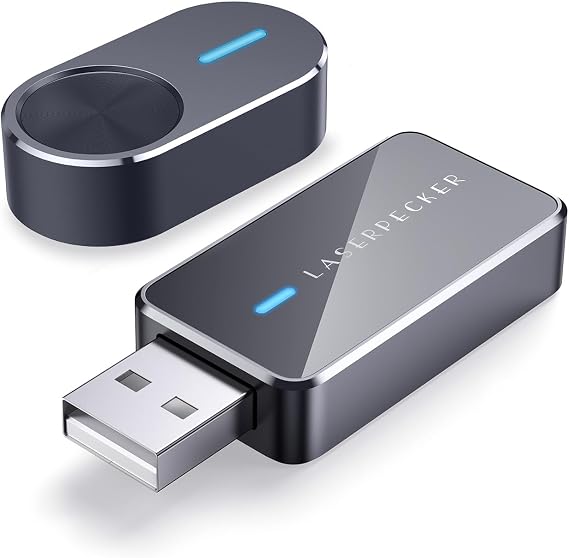
- Upgrade your engraving experience with LaserPecker Laser Engraver Accessories
- Includes Bluetooth Dongle and Batch Engraving Button
- Portable and convenient for on-the-go use
- Easily engrave multiple items with the Batch Engraving Button
- Simple setup and compatibility with Windows and Mac systems
- Made of durable aluminum alloy material in gray color
| Brand Name | LaserPecker |
| Manufacturer | LaserPecker |
| Model Number | LP-BD/BEB |
| Manufacturer Part Number | LP-BD/BEB |
| Item Type Name | Bluetooth Dongle and Batch Button |
| Unit Count | 1.0 Count |
| Color | Black |
| Style Name | Laser |
| Item Dimensions L x W | 2.13"L x 1.61"W (5.4 cm) |
| Material Type | Aluminum, Glass |
| Operation Mode | Manual |
| Level Measurement Type | laser |
| Brand | LaserPecker |
| Material | Aluminum, Glass |
| Product Dimensions (L x W x H) | 2.13"L x 1.61"W (5.4 cm) |
| Style | Laser |
| Item Weight | 0.5 lbs (230 grams) |
Who Should Buy?

-
Small Business Owners
Ideal for entrepreneurs needing to quickly produce customized engravings for gifts, signage, and promotional materials.
-
DIY Enthusiasts
Great for hobbyists looking to enhance their projects with intricate laser engravings on various materials.
-
Manufacturing Professionals
Useful for businesses that require fast and efficient batch engraving for production lines and product labeling.

-
Casual Users
Not suitable for occasional users who engrave rarely, as the setup may be overly complex for minimal use.
Product Description
LaserPecker Laser Engraver Accessories, Bluetooth Dongle & Batch Engraving Button for LP4 & LP2 & LP3 Engraving Machines - Effortlessly Engrave for PC Connection & Batch Produce
Have any Query? Chat with us
Customer Questions & Answers
-
Question:
What are the main accessories included with the LaserPecker Laser Engraver?
Answer: The LaserPecker Laser Engraver comes with several essential accessories including the Bluetooth Dongle and the Batch Engraving Button. The Bluetooth Dongle allows for seamless wireless connectivity between your engraving machine and your devices, enhancing user convenience and flexibility. The Batch Engraving Button enables you to execute multiple engraving tasks efficiently with just a single press, thereby optimizing the overall engraving process. This means you can focus more on creativity and less on manual operations. -
Question:
How does the Bluetooth Dongle enhance the functionality of the LaserPecker engravers?
Answer: The Bluetooth Dongle significantly improves the functionality of LaserPecker engraving machines by enabling wireless communication. This feature allows users to control the engraving process from their smartphones or tablets, providing greater flexibility and ease of use. Users can upload designs and monitor their progress from a distance, making it ideal for complex projects that require multitasking or remote operation. It's perfect for those looking to operate their engraver hands-free while exploring creativity. -
Question:
Can I use the LaserPecker accessories with both LP2 and LP3 models?
Answer: Yes, the accessories, including the Bluetooth Dongle and Batch Engraving Button, are compatible with both the LP2 and LP3 LaserPecker engraving machines. This versatility means users can easily upgrade their existing equipment without the need for additional accessories or functionalities. This is particularly beneficial for users transitioning between engraver models or those who wish to have backup tools available for different projects or settings. -
Question:
What types of materials can I engrave with LaserPecker machines?
Answer: LaserPecker machines are capable of engraving on a wide range of materials including wood, acrylic, leather, and fabric. This material versatility makes LaserPecker an ideal choice for hobbyists and professionals alike, allowing them to create custom designs on various surfaces for different applications. Users can personalize gifts, create signage, or even craft intricate designs for artistic projects, showcasing the engraving machine’s adaptability across multiple domains. -
Question:
Is it possible to batch engrave multiple items with the LaserPecker?
Answer: Absolutely! The Batch Engraving Button included with LaserPecker allows users to engrave multiple items simultaneously with just one command. Once your designs are set up, you can load multiple pieces onto the engraving surface and initiate the batch process. This feature is particularly valuable for small business owners or crafters who need to produce several identical items efficiently, saving time and effort while maintaining high-quality results. -
Question:
What are the safety features of the LaserPecker engravers?
Answer: LaserPecker engravers come equipped with several safety features designed to protect both the user and the equipment. These include an automatic shut-off function in case of overheating, protective covers to minimize contact with the laser, and built-in safety protocols that detect any irregularities during operations. These features ensure safer use for beginners and seasoned operators alike, allowing for worry-free creative exploration. -
Question:
How do I maintain my LaserPecker engraver for optimal performance?
Answer: Maintaining your LaserPecker engraver involves a few simple steps to ensure its longevity and optimal performance. Regularly clean the lenses and the surface of the machine to prevent residue build-up and maintain clarity during engraving. It’s also important to ensure that the engraving surface is level and free from debris for consistent results. Periodic software updates are crucial too, as they improve any bugs and enhance features, ensuring you make the most of your device. -
Question:
Can I connect my LaserPecker engraver to my smartphone or tablet?
Answer: Yes, one of the significant benefits of the LaserPecker engraving machines is their ability to connect to smartphones and tablets via Bluetooth, thanks to the included Bluetooth Dongle. This functionality allows users to upload designs directly from their mobile devices, monitor progress, and control the engraving process easily. This capability is particularly useful for those who prefer mobile usability or who frequently create on-the-go, merging convenience with creativity. -
Question:
Where can I buy LaserPecker Laser Engraver Accessories, Bluetooth Dongle & Batch Engraving Button for LP2 & LP3 Engraving Machines?
Answer: You can purchase LaserPecker Laser Engraver Accessories, including the Bluetooth Dongle and Batch Engraving Button, from Ubuy. This platform offers a vast selection of products with a focus on quality and customer satisfaction, making it a reliable choice for all your engraving needs in Trinidad and Tobago. -
Question:
What kind of projects can I create with LaserPecker engravers?
Answer: With LaserPecker engravers, you can embark on a vast array of projects, from personalizing gifts like wooden coasters and leather wallets to creating intricate art pieces and crafting customized business branding tools. The precision and flexibility offered by the engravers allow for both simple and complex designs, accommodating everything from hobbyist endeavors to professional applications. Users love the ability to bring their unique vision to life, whether it’s creating meaningful items or developing commercial products.
LaserPecker Engraving Machines & Tools LP-BD/BEB Editorial Review
No editorial reviews found
Customer Reviews & Ratings
1 customers ratings
-
5 Star
0%
-
4 Star
100%
-
3 Star
0%
-
2 Star
0%
-
1 Star
0%
Review this product
Share your thoughts with other customers
Platform Trust & Buyer Confidence

MA
Mohammad
Verified buyer
“Excellent quality and original too,when ubuy send original things I will appreciate that ,I very satisfied thank you”
23 July 2026 · via Trustpilot
CK
Chitra
Verified buyer
“The order and delivery progress was communicated very well. Package arrived within the estimated time. Products arrived as expected in good condition.”
22-Jul-26 · via Trustpilot
K
kund
Verified buyer
“Good supply of products. Safe payment methods, and shipment worldwide! Genuine products.”
23-Jul-26 · via Trustpilot
OO
Onesi
Verified buyer
“Was my first time buying a product from Ubuy, but I found it so helpful. This is reliable. Gonna place a new order!”
22 July 2026 · via Trustpilot
SJ
SAO JOHN
Verified buyer
“Ubuy is a great online platform to buy stuff. Reliable, fast delivery time and great value for money. I've been using Ubuy online shopping platform for three years now and will continue to do so.”
23 July 2026 · via Trustpilot
Secure Checkout
Global Delivery
Easy Returns
Genuine Products
Product Price History
Important information
- Limitations : For products shipped internationally, please note that any manufacturer warranty may not be valid; manufacturer service options may not be available; product manuals, instructions, and safety warnings may not be in destination country languages; the products (and accompanying materials) may not be designed in accordance with destination country standards, specifications, and labeling requirements; and the products may not conform to destination country voltage and other electrical standards (requiring use of an adapter or converter if appropriate). The recipient is responsible for assuring that the product can be lawfully imported to the destination country. When ordering from Ubuy or its affiliates, the recipient is the importer of record and must comply with all laws and regulations of the destination country.
- Not all the products listed on Ubuy are for sale, as Ubuy is a global search engine. Products are subject to export/trade regulations.
TTD 881
Order now and get it around Sunday, August 16
This item is not restrict in my country.(Please click on above link if this item is not restrict in your country, So our team will review and allow.)
QTY:
Secured transaction
PCI DSS compliant and ISO 27001:2022 certified, with encrypted payments and full buyer protection on every order.
Our Top Logistics Partners
Fastest cross-border delivery
Features & Benefits
- Upgrade your engraving game
- Bluetooth Dongle & Batch Engraving Button
- Portable & Convenient
- Batch Engraving Made Easy
- Simple to Use
- Compatible with Any System
Ubuy Assurance
Experience worry-free shopping with 100% original products, PCI DSS-compliant payment security, ISO 27001-certified data protection, the fastest cross-border delivery, free returns *, and secure packaging on every order.