- Home Page /
- Electronics /
- Computer Accessories /
- Computer Accessories & Peripherals /
- Input Devices /
- Graphics Tablets /
- Drawing Tablet XPPen StarG640 Digital Graphic...
0 ratings


Item #:
7793532
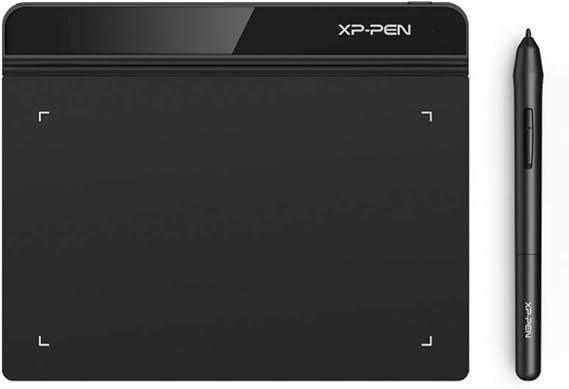
Drawing Tablet XPPen StarG640 Digital Graphic Tablet 6x4 Inch Art Tablet with Battery-Free Stylus Pen Tablet for Mac, Windows and Chromebook
Item #:
7793532
TTD 283
Price Details
Excluding Shipping & Custom charges ( Shipping and custom charges will be calculated on checkout )
*All items will import from US
0 ratings
Write a review
In stock
 Imported from USA store
Order now and get it around Monday, June 29
Secured transaction
Ubuy works hard to protect your security and privacy. Our advanced payment security system ensures confidentiality by encrypting your information during transmission using AES (Advanced Encryption Standards) and SSL (Secure Socket Layer) protocols. Your payment details are 100% secure as we do not share your payment details with third party sellers.
Our Top Logistics Partners


The XPPen StarG640 graphic drawing tablet is the perfect replacement for a traditional mouse!

Fast
Shipping

Free
Return*

Secure Packaging

100% Original Products

PCI DSS Compliance

ISO 27001 Certified


What Stands Out
Battery-Free Stylus
Enjoy uninterrupted creativity with the battery-free stylus, providing a seamless drawing experience without the hassle of charging, enhancing productivity and convenience for artists and professionals alike.
Wide Compatibility
Compatible with Mac, Windows, and Chromebook, this tablet caters to diverse users, making it the perfect choice for artists, students, and remote workers seeking versatile solutions for their creative and learning needs.
Compact Size
The 6x4 inch design offers portability without sacrificing workspace, making it ideal for on-the-go artists and students, allowing for easy setup in any environment ranging from classrooms to coffee shops.
Product Details
Dangerous Goods
To avoid the delay in customs clearance process for Dangerous Goods, the shipment shall be opened at our warehouse facility to check the severity of hazardous components. Please see the list of Dangerous goods here.
Who Should Buy?

-
Beginner Artists
Ideal for novice artists wanting to explore digital art without high investment in advanced tools.
-
Students & Learners
Perfect for students engaged in e-learning, offering a smooth experience for noting and drawing during virtual classes.
-
Remote Workers
Beneficial for professionals needing to engage in graphic design or illustration tasks while working remotely.

-
Professional Designers
May lack advanced features required by professionals, limiting productivity for high-end design projects.
-
Gamers and Streamers
Not suitable for gaming needs, as it's primarily designed for drawing and graphic tasks rather than gaming.
-
Large Canvas Users
The limited 6x4 inch size may restrict those who prefer working with larger canvases for detailed artwork.
Product Description
Drawing Tablet XPPen StarG640 Digital Graphic Tablet 6x4 Inch Art Tablet with Battery-Free Stylus Pen Tablet for Mac, Windows and Chromebook DrawingE-LearningRemote-Working
Have any Query? Chat with us
Customer Questions & Answers
-
Question:
What devices are compatible with the XPPen StarG640 Drawing Tablet?
Answer: The XPPen StarG640 Drawing Tablet is compatible with a range of devices including Mac, Windows PCs, and Chromebooks. This versatility makes it an excellent choice for users across different platforms, whether you're using graphic design software on a Mac or drawing directly on a Chromebook. Many artists and designers appreciate the cross-compatibility for seamless integration into their existing workflows. -
Question:
How does the battery-free stylus pen work?
Answer: The battery-free stylus pen included with the XPPen StarG640 utilizes electromagnetic resonance technology, allowing it to draw without the need for batteries. This eliminates the fuss of changing batteries frequently and provides a lightweight feel, which many artists find comfortable during extended use. Whether sketching, illustrating, or creating digital art, the stylus remains responsive and ready to assist in your creative endeavors. -
Question:
What is the active area size of the XPPen StarG640?
Answer: The active area of the XPPen StarG640 is 6x4 inches, offering a compact yet sufficient workspace for drawing and editing. This size is ideal for artists who need portability and prefer a smaller drawing tablet that can easily fit in a desk setup or even a backpack for on-the-go creations. Use it in cafes, libraries, or at home to unleash your creativity without taking up much space. -
Question:
Is the XPPen StarG640 suitable for beginner artists?
Answer: Absolutely! The XPPen StarG640 is particularly friendly for beginners. Its simple setup and intuitive interface allow new users to dive into their artistic journey without overwhelming complexity. With pressure sensitivity and a natural drawing feel, aspiring artists can practice skills in digital illustration, making it a perfect introductory tool for those looking to develop their talent. -
Question:
Can I use the tablet for photo editing?
Answer: Yes, the XPPen StarG640 is excellent for photo editing tasks. The precision of the battery-free stylus allows for fine adjustments and detailed corrections, which are crucial when enhancing images. Photographers can benefit from using this tablet to combine digital art techniques with photo editing software, making it a versatile tool for enhancing your creative projects. -
Question:
What design software can I use with the XPPen StarG640?
Answer: The XPPen StarG640 works well with popular design software such as Adobe Photoshop, Illustrator, CorelDRAW, and various drawing applications like Krita and Clip Studio Paint. This compatibility opens doors for digital artists to explore a wide range of creative options, from vector illustrations to complex digital paintings. The tablet helps streamline your creative process and enrich your design experience. -
Question:
How do I set up the XPPen StarG640 on my computer?
Answer: To set up the XPPen StarG640, simply connect it to your computer using the USB cable, install the necessary drivers from the XPPen website, and customize settings as needed. The straightforward installation process is beginner-friendly and allows users to adjust pressure sensitivity and other preferences according to their artistic needs. Once set up, you can start using it with your favorite programs right away. -
Question:
Does the tablet come with customizable shortcut keys?
Answer: The XPPen StarG640 does not feature customizable shortcut keys as it is designed for portability and simplicity. However, its integration with software allows you to create your own shortcuts within applications, enhancing your workflow. This flexibility helps you work more efficiently, particularly during intensive projects where every second counts. -
Question:
Can I use the XPPen StarG640 for gaming?
Answer: While the primary function of the XPPen StarG640 is for digital drawing and design, some users also enjoy using it for gaming, especially in creative games that support stylus input. This opens up a unique way to interact with gaming worlds, allowing for more personalized experiences. Gamers looking to explore artistic expression or map controls will find the tablet a fun addition to their gaming toolkit. -
Question:
Where can I buy the XPPen StarG640 Drawing Tablet in Trinidad and Tobago?
Answer: You can purchase the XPPen StarG640 Drawing Tablet from Ubuy in Trinidad and Tobago. Ubuy offers a wide selection of digital art tools, and buying through their platform ensures you find what you need for your artistic projects. They provide options for seamless shopping, helping you acquire the tablet conveniently and efficiently.
XP-PEN Graphics Tablets Editorial Review
The XP-PEN StarG640 Digital Graphics Tablet is a highly functional, affordable option for beginners or anyone looking for an alternative to pricier drawing tablets. Compatible with a variety of drawing software, it comes with a standard USB cord, so users with newer MacBooks will need a converter for the connection. While it doesn't have palm rejection, it works great for circling items and handwriting text in PowerPoint. The cursor reflecting on the PC makes it easy to follow while using it with Word or Excel, and it's great for both drawing and using as a mouse. The pressure sensitivity is excellent, and even though the setup may be a little confusing to those who haven't used a drawing tablet before, there are tutorials available on YouTube.
Customer Reviews & Ratings
1 customers ratings
-
5 Star
100%
-
4 Star
0%
-
3 Star
0%
-
2 Star
0%
-
1 Star
0%
Review this product
Share your thoughts with other customers
Pros
- Affordable for a graphics tablet
- Compatible with a variety of drawing software
- Pressure sensitivity is excellent
- Cursor reflecting on the PC makes it easy to follow, and can be used as a mouse
- Great for beginners
Cons
- No palm rejection
Product Price History
Important information
- Limitations : For products shipped internationally, please note that any manufacturer warranty may not be valid; manufacturer service options may not be available; product manuals, instructions, and safety warnings may not be in destination country languages; the products (and accompanying materials) may not be designed in accordance with destination country standards, specifications, and labeling requirements; and the products may not conform to destination country voltage and other electrical standards (requiring use of an adapter or converter if appropriate). The recipient is responsible for assuring that the product can be lawfully imported to the destination country. When ordering from Ubuy or its affiliates, the recipient is the importer of record and must comply with all laws and regulations of the destination country.
- Not all the products listed on Ubuy are for sale, as Ubuy is a global search engine. Products are subject to export/trade regulations.
TTD 283
Order now and get it around Monday, June 29
This item is not restrict in my country.(Please click on above link if this item is not restrict in your country, So our team will review and allow.)
QTY:
Secured transaction
Ubuy works hard to protect your security and privacy. Our advanced payment security system ensures confidentiality by encrypting your information during transmission using AES (Advanced Encryption Standards) and SSL (Secure Socket Layer) protocols. Your payment details are 100% secure as we do not share your payment details with third party sellers.
Our Top Logistics Partners
Fastest cross-border delivery
Features & Benefits
- Super slim design at only 2mm thick for easy portability.
- Plug and play connectivity with USB-A port compatibility.
- Battery-free stylus allows for uninterrupted drawing and enhanced performance.
- Compatible with a wide range of software including free and paid programs.
- Ideal for online education, digital drawing, and multiple use cases.
- Perfect for both creators and students, enhancing productivity.